
CopyNest Pricing & FAQ Download

A clipboard manager for macOS

You copy fifty things a day.

A link. A phone number. An address. A code from a text message. Your Mac keeps exactly one of them.

The rest are gone.

Copy something else and the last one disappears. No undo, no history, no way back.

Clipboard Flat 12, 48 Marina Street, Muscat 138

Three clips, already lost.

CopyNest keeps every one.

Text, links, code, images, files, colours. One shortcut brings them all back.
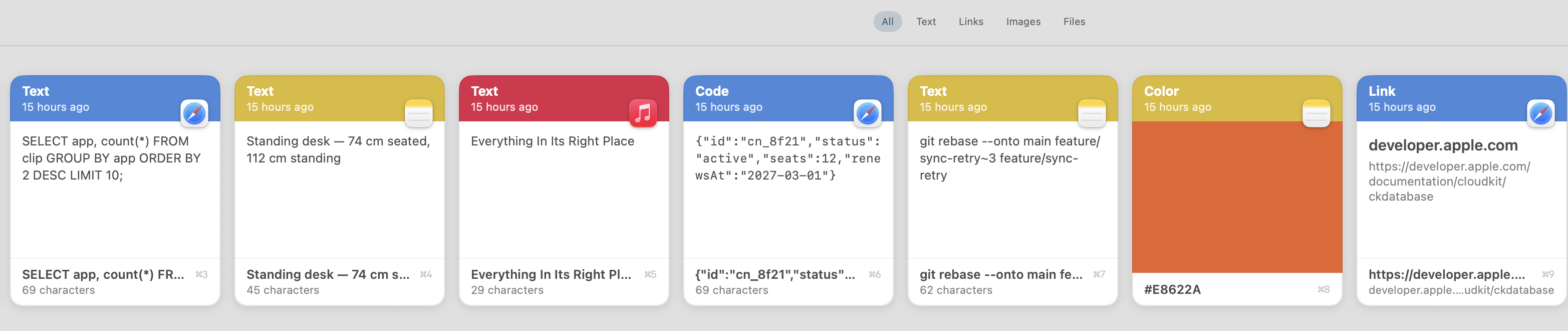
CopyNest's shelf: cards for a SQL query, a note about desk height, a song title from Music, a JSON payload, a git command, the colour #E8622A shown as a swatch, and a link to developer.apple.com — each labelled by kind and marked with the app it came from.

Find it by what it said.

Search the text. Filter by app, or by kind. Even the words inside your screenshots.
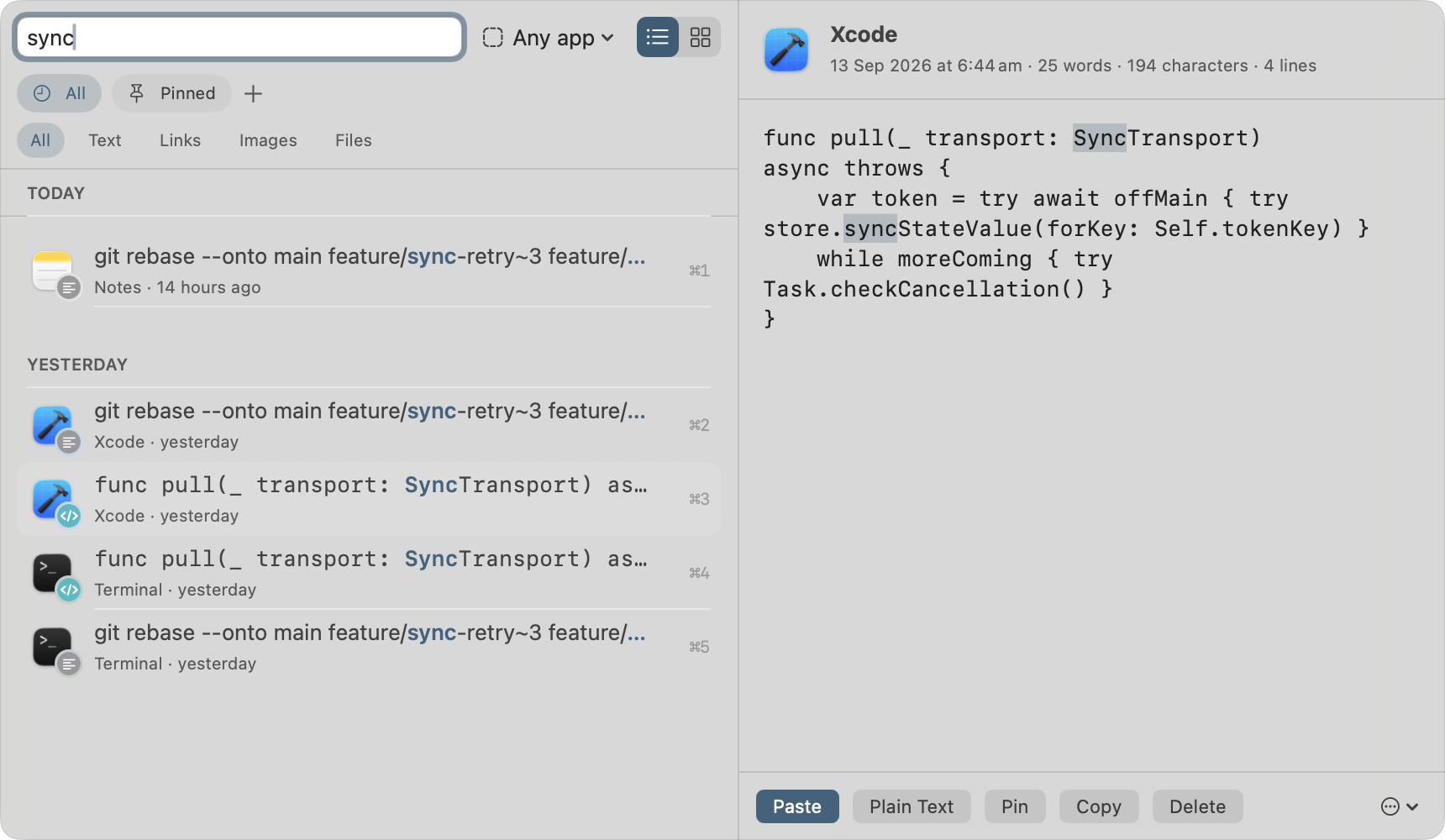
A search for "sync" in CopyNest, matching five clips from Notes, Xcode and Terminal with the word highlighted in each, grouped under Today and Yesterday, and the selected Xcode snippet shown in the preview pane.

Except what it shouldn't keep

Copied a card number? It's already hidden.

Card numbers, API keys and access tokens are caught the moment you copy them. Masked in the list. Never synced, never sent to AI, never exported.
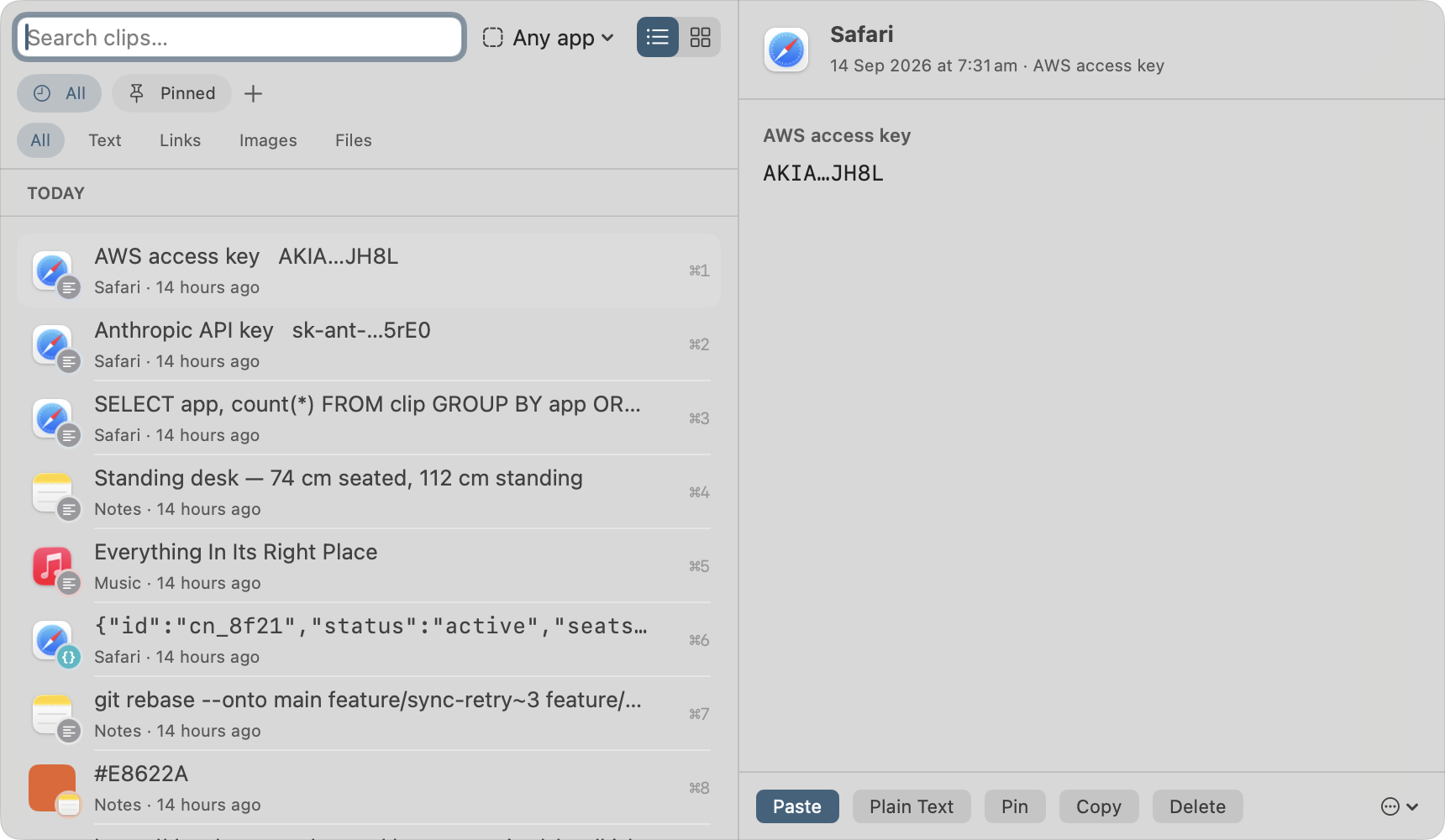
An AWS access key shown as AKIA…JH8L and an Anthropic API key as sk-ant-…5rE0, both labelled by type and masked, beside ordinary clips showing their full text.

Why this one exists

Claude Code can read your clipboard.

CopyNest speaks MCP over HTTP — so can Cursor, VS Code, Windsurf and Zed. They search what you copied and hand the answer straight back.


Setup

One command. That's it.

Copy it from Settings with your port and token already filled in. Choose what a tool is allowed to see. Revoke it whenever you like.
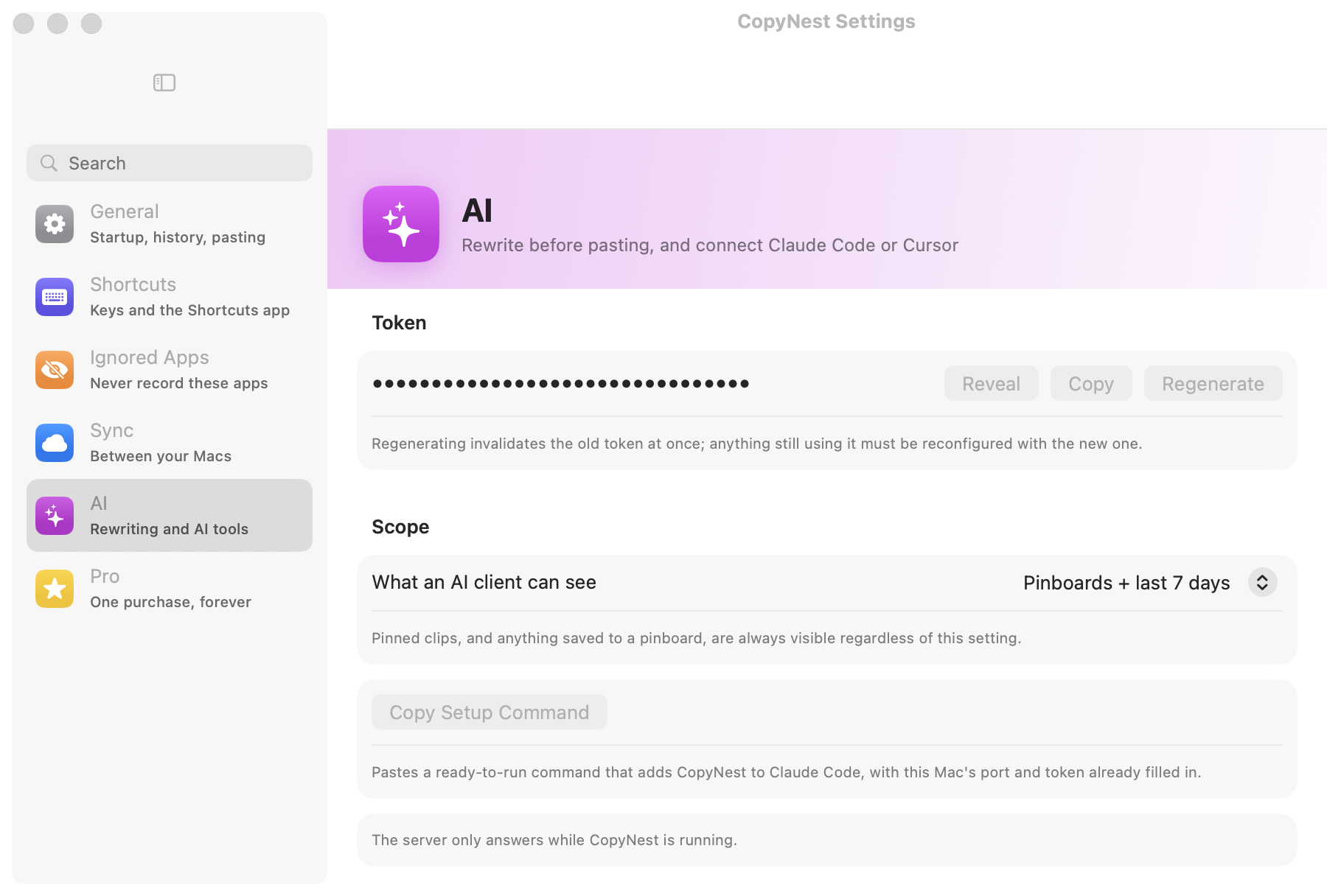
CopyNest's AI settings: a masked access token with Reveal, Copy and Regenerate buttons, a scope picker set to "Pinboards + last 7 days", and a Copy Setup Command button.

Smart paste

Paste it in the shape you need.

JSON formatted, base64 decoded, camelCase, escaped string — and only the ones that suit the clip. These are the app's real rules, running here.

Copied

        
Paste as…


Once. Not every year.

No subscription, no account, no servers, nothing collected. A free tier that never runs out, and 14 days of everything to decide.

$14.99one purchase, for good

Download on the Mac App Store

macOS 14 or later · Apple silicon and Intel · what's in the free tier
What you get

The free tier isn't a trial. It's the whole app with a shorter memory.

FreePro
Clipboard history and search
Smart actions and per-app paste rules
Credential masking
Export to JSON, CSV, Markdown
Keeps clips for30 daysAs long as you like
Pinboards, paste stack, transformations
Searchable text in screenshots
iCloud sync between Macs
AI tools over MCP
Free forever$14.99 once

The rest of it

The parts you find in week two.

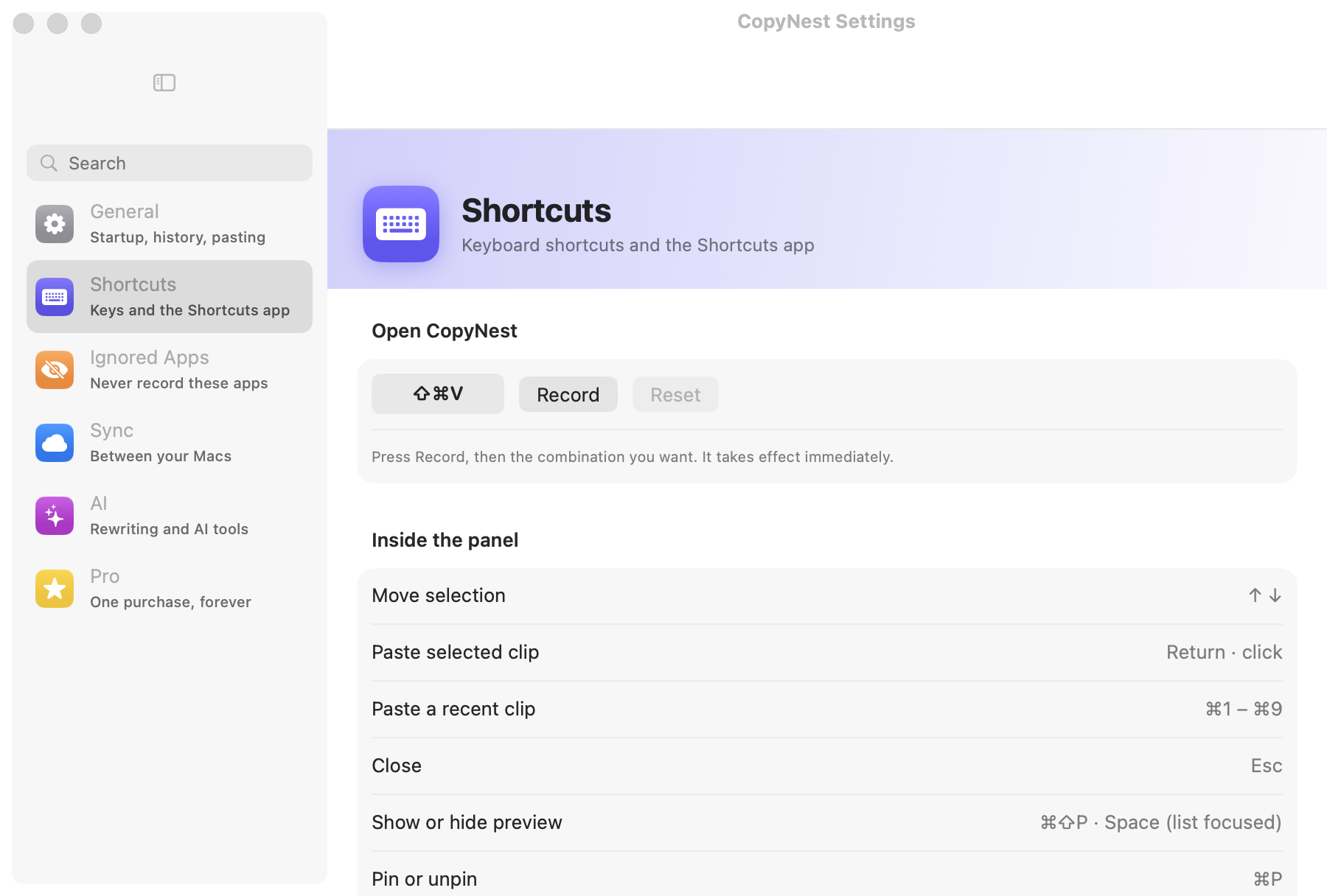
CopyNest's Shortcuts settings: the ⇧⌘V shortcut with a Record button, and the keys inside the panel — arrows to move the selection, Return to paste, ⌘1 to ⌘9 for a recent clip, Esc to close.

Pinboards

Addresses, snippets, boilerplate. The things you paste every week, kept out of the churn.

Paste stack

Collect several clips, then paste them one after another in order.

Merge paste

Select a handful and paste them as one block — lines, commas or tabs.

Smart actions

Open a link, start an email, reveal a path in Finder, or take the answer to a sum straight off the clip.

Today's digest

What you copied today, which apps it came from, every link you collected.

Two layouts

A keyboard-driven list, or a shelf of cards. Switch from the window, not a settings page.

Shortcuts

Five actions for the Shortcuts app, so your automations reach the history too.

Nine languages

English, Spanish, French, German, Italian, Japanese, Korean, Chinese and Portuguese.

What leaves your Mac

Nothing. Not unless you turn sync on, and then only to your own iCloud.

No account, no analytics

No sign-in, no telemetry, no crash reporting. There is no server to send anything to.

Sync is your iCloud

Clips go to your own private database, on your own quota. Nobody else can read it, us included.

AI runs on your Mac

Apple Intelligence, on-device. Prefer your own Claude key? That is your account and your bill.

Before you ask

Is this a subscription?

No. CopyNest is $14.99, bought once from the Mac App Store, and that is the end of it. A future major version may be a separate paid upgrade, years from now — the version you buy keeps working and keeps getting fixes either way.

What happens to my clipboard history?

It stays in CopyNest's sandboxed container on your Mac. There is no CopyNest account and no CopyNest server. If you turn on sync, clips go to your own private iCloud database on your own storage quota, which we cannot read.

Do you see my API keys?

No, and neither does anything else. CopyNest recognises keys, tokens, private keys and card numbers as you copy them. Those clips are shown masked, excluded from iCloud, never given to an AI tool in full, and left out of exports. Anything another app marks as confidential is not recorded at all.

Is MCP only for Claude Code?

No. CopyNest serves MCP over HTTP, which Claude Code, Cursor, VS Code, Windsurf and Zed all speak directly. Claude Desktop speaks stdio only, so it needs a small bridge — mcp-remote — and the config for that is on the support page.

What can an AI tool actually do with it?

Search your history, read a clip you point it at, and put text back on your clipboard. That is the whole surface. It works over a local connection on 127.0.0.1 that needs a token you can revoke, it only answers while CopyNest is running, and detected credentials come back masked even there.

Does it need Accessibility permission?

Only to paste for you. Without it, choosing a clip copies it and you press ⌘V yourself — everything else works the same.

Will it slow my Mac down?

It is a small native app with no background network activity. Text recognition in screenshots runs on-device, once per image, when the image is captured.

What does the free tier leave out?

History older than 30 days, pinboards, the paste stack, transformations, searchable screenshot text, iCloud sync and MCP. Search, smart actions, credential masking and export are there forever, free.

Can I get my data out?

Yes — JSON, CSV or Markdown, from Settings, at any time. Detected credentials are the one thing left out of an export, deliberately.

Does sync work between more than two Macs?

Yes, any Macs signed in to the same Apple Account. Files stay on the Mac they were copied on, and a detected credential stays local unless you pin it.

Which Macs does it run on?

macOS 14 Sonoma or later, Apple silicon or Intel. The on-device AI features need a Mac that supports Apple Intelligence; everything else does not.

Something is broken. What now?

Email support@copynest.app and a person answers. Refunds go through Apple, but write to us first — we would rather fix it.